


Executing Warehouse Zones with Advanced Interleaving in SAP EWM on S/4HANA
- Aman Jain

- Aug 16, 2024
- 4 min read
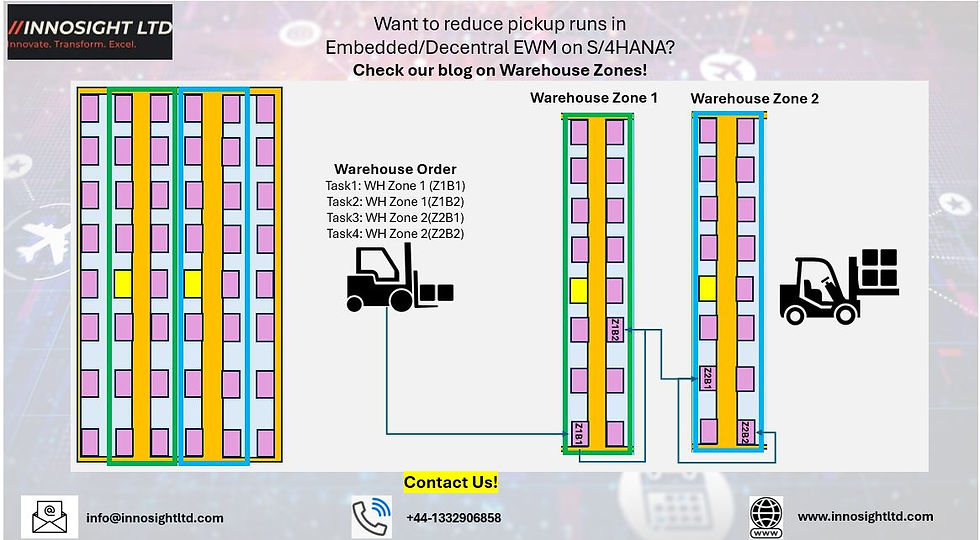
Introduction
In today's competitive Consumer Product Group (CPG) industry, efficient warehouse operations are crucial to maintaining profitability and customer satisfaction. SAP Extended Warehouse Management (EWM) on S/4HANA introduces Advanced Interleaving, a feature that optimizes warehouse processes by combining tasks such as picking and putaway into a single, efficient workflow. This blog provides an end-to-end example of how this functionality can be leveraged in a CPG company, including step-by-step instructions for setting it up and executing it in a live SAP EWM environment.
Business Scenario: Consumer Product Group
Consider a CPG company that manages a diverse range of products, including household cleaning supplies, personal care items, and food products. The warehouse is divided into zones based on product type—such as a zone for liquid products, another for packaged dry goods, and a third for temperature-controlled items.
To optimize warehouse operations, the company implements Advanced Interleaving in SAP EWM, allowing workers to complete multiple tasks in one trip, thereby reducing travel time and increasing overall efficiency.
End-to-End SAP EWM System Run
Here’s a step-by-step guide to executing an end-to-end process using Advanced Interleaving and warehouse zones in SAP EWM on S/4HANA:
Step 1: Create Sales Order
- Start by creating a Sales Order in SAP S/4HANA. This order represents the customer's request for products.
- Navigate to Sales and Distribution > Sales > Order > Create (Transaction code: VA01).
- Enter the necessary details, such as customer information, product codes, and quantities.

Step 2: Create Outbound Delivery
- Once the Sales Order is saved, create an Outbound Delivery to initiate the shipping process.
- Go to Logistics Execution > Outbound Process > Goods Issue for Outbound Delivery > Create (Transaction code: VL01N).

Step 5: Release Wave for Outbound Delivery Order (ODO) and create Warehouse Orders
- The next step involves releasing a Wave, which groups multiple deliveries together for efficient processing.
- Navigate to Extended Warehouse Management > Outbound Process > Wave Management > Release Waves (Transaction code: /SCWM/WAVE).
- The Wave release triggers warehouse tasks for picking, which are then assigned based on proximity using the configured warehouse zones.
- The wave release will create warehouse orders from different areas of the warehouse in which bins are clubbed in warehouse zones.
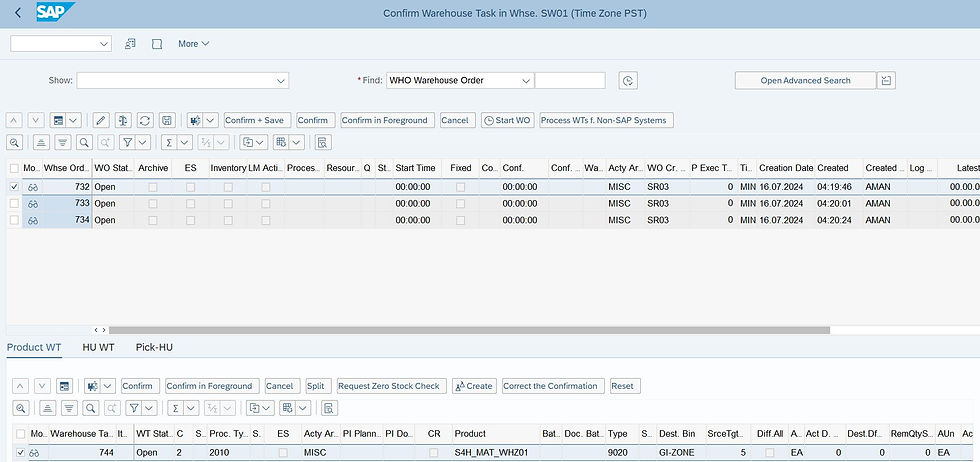

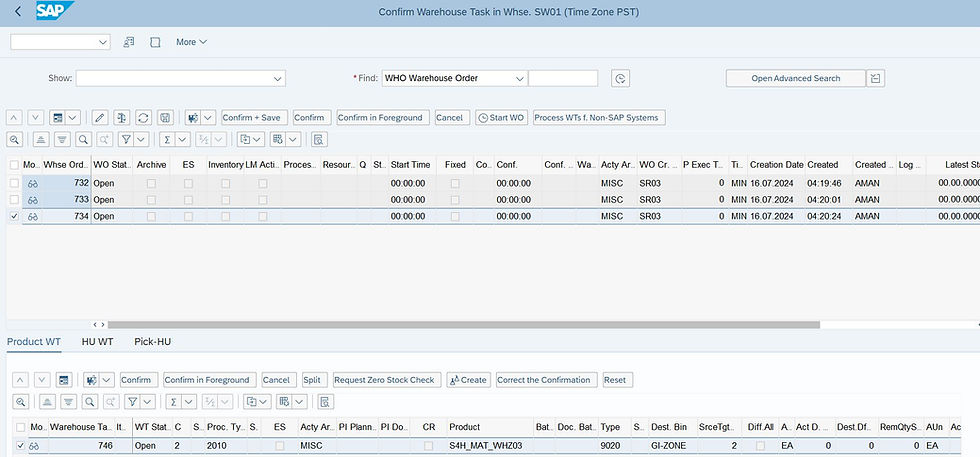
Step 6: Execute Picking and Putaway with Advanced Interleaving
- The system generates warehouse tasks for picking items from their respective zones. For example, if the first task is to pick liquid products, the system will also check for nearby putaway tasks (e.g., placing temperature-sensitive items) to optimize the worker’s route.
- Workers execute these tasks using RF devices or warehouse terminals, reducing the number of trips and improving efficiency.





Step 7: Confirm Warehouse Tasks
- Once the picking and putaway tasks are completed, confirm the tasks in the system.
- This is done by navigating to Extended Warehouse Management > Work Scheduling > Monitor > Warehouse Task (Transaction code: /SCWM/TO_CONF).
- The confirmation updates inventory and prepares the goods for the next steps in the outbound process.
Step 8: Goods Issue Posting
- Finally, post the Goods Issue, which officially records the removal of goods from the warehouse and updates the inventory.
- Navigate to Logistics Execution > Outbound Process > Goods Issue for Outbound Delivery > Post Goods Issue (Transaction code: VL02N).
- This step completes the outbound process, and the goods are now en route to the customer.
SPRO Configuration for Advanced Interleaving
To ensure that Advanced Interleaving and warehouse zones function correctly, the following SPRO configurations are essential:
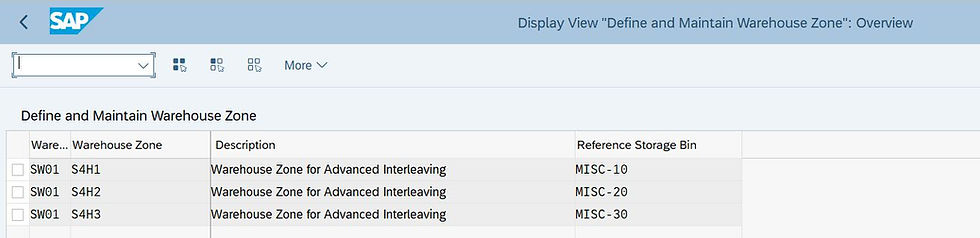
1. Define Warehouse Zones:
- Path: Extended Warehouse Management > Master Data > Define Warehouse Zones.
- Create zones based on the layout and product types in the warehouse.
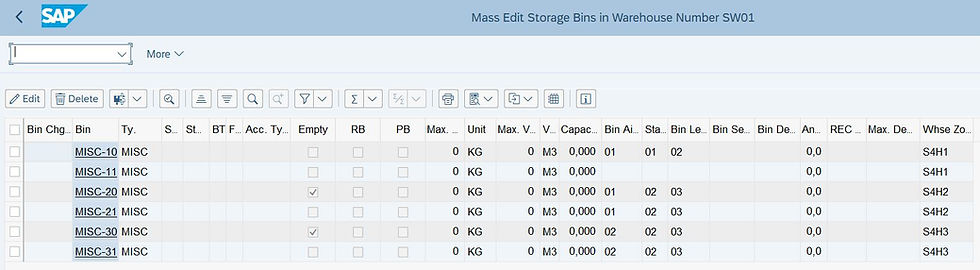
2. Assign Zones to Storage Bins:
- Path: Extended Warehouse Management > Master Data > Storage Bin.
- Assign storage bins to the appropriate zones.
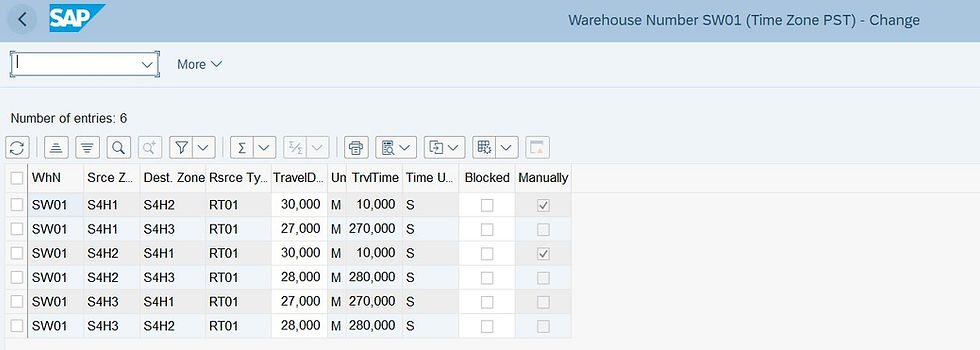
3. Configure Resource Types and Queue Determination:
- Resource Types: Extended Warehouse Management > Master Data > Define Resource Types.
- Queue Determination: Extended Warehouse Management > Cross-Process Settings > Queue Determination.
4. Activate Interleaving and Warehouse Zones:
- Path: Extended Warehouse Management > Cross-Process Settings > Resource Management > Interleaving Control.
- Adjust interleaving strategies to optimize task assignments.

Business Benefits
Implementing Advanced Interleaving in a CPG warehouse offers significant advantages:
1. Increased Productivity: By minimizing travel time, workers can accomplish more in less time.
2. Reduced Operational Costs: Fewer trips mean less wear and tear on equipment and lower energy consumption.
3. Enhanced Flexibility: The dynamic assignment of tasks based on proximity allows the warehouse to adapt quickly to changing demands.
4. Improved Worker Satisfaction: More efficient task flows lead to reduced worker fatigue and higher satisfaction.
Conclusion
For CPG companies, SAP EWM’s Advanced Interleaving is a powerful tool to streamline warehouse operations. By effectively utilizing warehouse zones and following the steps outlined above, businesses can achieve higher productivity, lower costs, and better overall warehouse performance.
For more insights on SAP EWM configurations and best practices, visit our [blog](https://www.innosightltd.com/blog).
Know More
Contact us with your queries on how to set this and other scenarios in your system as part of system build or quick Proof of Concept, without incurring much cost.


Comments